This guide covers everything you need to make informed decisions about network cabling: cable types and their real-world performance limits, industry standards that ensure compatibility, installation considerations that prevent costly mistakes, and how to choose solutions that support both current operations and future growth.
Key Takeaways
- Cat6A is the baseline for commercial installations—10 Gbps over 100m with high-power PoE support
- Fiber optic (OM4/OS2) delivers EMI immunity, 40-100+ Gbps speeds, and 100km distance capability
- BICSI/Panduit-certified installation reduces downtime and unlocks 20-25 year warranties
- Plan for 30-50% bandwidth overhead to accommodate growth without costly re-cabling
- TIA-568 and NEC compliance ensures performance, safety, and future-proofing
What is Network Cabling?
Network cabling is the physical medium that connects devices within an IT infrastructure, enabling data, voice, and video transmission between computers, servers, phones, security cameras, and wireless access points.
While wireless networks get more attention, every Wi-Fi access point, IP camera, and VoIP phone ultimately connects to a wired backbone.
Structured vs. Ad-Hoc Installations
Structured cabling systems follow standardized designs defined by ANSI/TIA-568 and ISO/IEC 11801. These systems organize infrastructure into six subsystems:
- Entrance facilities
- Equipment rooms
- Backbone cabling
- Telecommunications rooms
- Horizontal cabling
- Work area outlets
This approach creates a unified platform that supports multiple vendors and technologies.
In contrast, ad-hoc installations lack this organization. Cables run point-to-point without planning, documentation suffers, and troubleshooting becomes guesswork. When equipment changes, the entire mess often requires replacement.
The difference matters: structured cabling typically lasts 10-15 years and outlives multiple generations of switches and servers, while ad-hoc systems create bottlenecks and require frequent rework.
The Backbone for Wired and Wireless Networks
Even in wireless-first environments, cabling remains essential. Wi-Fi 6 and Wi-Fi 7 access points require multi-gigabit backhaul connections to deliver their advertised speeds. Security cameras, building management systems, and IoT sensors all depend on physical connections. Network cabling isn't competing with wireless—it's enabling it.
Types of Network Cabling
Choosing the right cable type determines your network's speed, distance capabilities, and reliability. Three primary categories dominate commercial installations.
Twisted Pair Copper Cables
Twisted pair cables contain four pairs of copper wires twisted together at precise rates. This twisting reduces electromagnetic interference (EMI) by canceling out external noise, a technique that has supported Ethernet since the 1980s.
Shielded vs. Unshielded:
- UTP (Unshielded Twisted Pair): Standard for most office environments where EMI is minimal
- STP/F/UTP (Shielded Twisted Pair): Required near manufacturing equipment, medical imaging devices, or anywhere heavy machinery creates electrical noise. Shielding only works when properly grounded per ANSI/TIA-607 standards
Cable Categories:
| Category | Bandwidth | Max Speed | Max Distance | Typical Applications |
|---|---|---|---|---|
| Cat5e | 100 MHz | 1 Gbps | 100 m | Legacy installations; minimum for Gigabit Ethernet |
| Cat6 | 250 MHz | 10 Gbps* | 55 m* | Enterprise LAN; 10G limited to short runs |
| Cat6A | 500 MHz | 10 Gbps | 100 m | Current baseline for new builds; supports PoE++ and Wi-Fi 6/7 |
| Cat7/7A | 600-1000 MHz | 10 Gbps | 100 m | ISO standard; requires shielding; not TIA-recognized |
| Cat8 | 2000 MHz | 25/40 Gbps | 30 m | Data center switch-to-server links only |
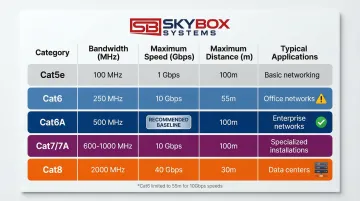
Cat6 supports 10 Gbps only at distances up to 55 meters, not the full 100-meter channel.
Why Cat6A is the smart choice: It costs only 10-15% more than Cat6 but eliminates distance limitations for 10 Gbps.
The cable also handles the thermal load from high-power PoE (up to 90W per port) without performance degradation, making it the industry-recommended minimum for future-proof installations.
Fiber Optic Cables
When copper distance or bandwidth limitations become constraints, fiber optic technology offers a solution. These cables transmit data as light pulses through glass or plastic strands, eliminating several copper limitations simultaneously.
Single-Mode vs. Multi-Mode:
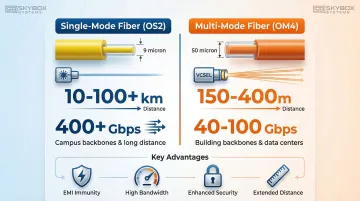
- Single-Mode Fiber (SMF/OS2): 9-micron core supports laser light sources. Reaches 10-100+ kilometers with virtually unlimited bandwidth. Standard for campus backbones and long-distance links
- Multi-Mode Fiber (MMF): 50-micron core uses less expensive VCSEL light sources. OM4 supports 10 Gbps up to 400 meters and 40/100 Gbps up to 150 meters. Ideal for building backbones and data centers
Key Advantages:
- EMI immunity: Fiber doesn't conduct electricity, so electromagnetic interference is impossible. Install it next to power lines, motors, or radio equipment without concern
- Bandwidth: OM4 multimode handles 40-100 Gbps; single-mode supports 400 Gbps and beyond
- Security: Fiber doesn't radiate signals that can be intercepted, and physical taps are immediately noticeable
- Distance: Single-mode reaches 100 kilometers without repeaters (copper tops out at 100 meters)
Important note: Fiber types must match transceiver specifications. OM3 won't deliver OM4 performance, and single-mode transceivers won't work with multimode fiber.
Coaxial Cables
Coaxial cable consists of a center conductor surrounded by insulation, a braided shield, and an outer jacket. This construction provides excellent shielding but has been largely replaced by twisted pair and fiber for data networking.
Legacy and Current Uses:
- Legacy Ethernet: 10BASE2 and 10BASE5 standards used coaxial cable in the 1980s-90s but are now obsolete
- Current applications: Cable television distribution, some security camera systems, and Distributed Antenna Systems (DAS) for cellular coverage
- Ethernet over Coax: Modern adapters can repurpose existing coaxial infrastructure for network connectivity in buildings where running new cable is impractical
Network Cabling Standards and Specifications
Standards ensure that cables from different manufacturers work together and perform as expected. Without them, every installation would be a gamble.
These standards are created and maintained by four key organizations.
Industry Standards Organizations
Four organizations define the rules for commercial cabling:
- TIA (Telecommunications Industry Association): Publishes ANSI/TIA-568, the primary standard for North American commercial cabling
- ISO/IEC: Maintains ISO/IEC 11801, the international equivalent used globally
- BICSI: Provides professional training, certifications (like RCDD), and the Telecommunications Distribution Methods Manual (TDMM)
- NEC/NFPA: Sets electrical safety and fire protection requirements through the National Electrical Code
These standards ensure interoperability across manufacturers, guarantee minimum performance levels, and provide a framework for future technologies.
TIA/EIA-568 Wiring Standards
Understanding termination schemes prevents costly wiring mistakes. The TIA-568 standard defines two schemes for RJ45 connectors:
- T568A: Required for federal government installations; swaps orange and green pairs compared to T568B
- T568B: Most common in commercial installations
Critical rule: Use the same standard throughout your installation. Mixing T568A and T568B creates crossover cables, which were once necessary to connect similar devices (switch-to-switch) but are now obsolete thanks to Auto MDI-X technology in modern equipment that automatically detects and corrects wiring.
Cable Performance Specifications
When selecting cable for your installation, three specifications determine performance:
- Bandwidth: Measures the frequency range a cable supports (100 MHz for Cat5e, 500 MHz for Cat6A). Higher bandwidth enables faster data rates.
- Attenuation: Describes signal loss over distance. All copper cables lose signal strength as length increases, which is why Ethernet has a 100-meter limit. Fiber experiences minimal attenuation—single-mode fiber can span 100 kilometers.
- Crosstalk: Interference between wire pairs within the same cable. Higher-category cables use tighter twist rates and better shielding to reduce crosstalk, enabling higher speeds.
Plenum and Riser Ratings
NEC fire safety codes mandate specific cable jackets based on installation location:
- CMP (Plenum): Required in air-handling spaces like drop ceilings and raised floors. Uses fire-resistant, low-smoke materials
- CMR (Riser): For vertical runs between floors. Prevents fire from spreading through cable shafts
- CM/CMG (General Purpose): For areas without special fire requirements
Hierarchy rule: Higher ratings can substitute for lower ones (install plenum-rated cable anywhere), but never use a lower rating where a higher one is required.
Violations create serious fire hazards and code compliance issues.
Key Considerations for Network Cabling Installation
Proper installation requires more than just running cable between two points. These factors determine whether your infrastructure performs reliably for a decade or creates problems from day one.
Planning and Design
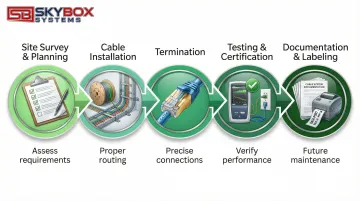
Site surveys identify current infrastructure, future needs, and environmental challenges before any cable is installed. A thorough survey documents:
- Existing cable pathways and telecommunications rooms
- Distance requirements between equipment locations
- Environmental factors (temperature, moisture, EMI sources)
- Building codes and fire safety requirements
Capacity planning calculates current bandwidth needs and adds 30-50% overhead for growth. Installing Cat6A instead of Cat6 costs 10-15% more today but avoids for re-cabling when 10 Gbps becomes standard.
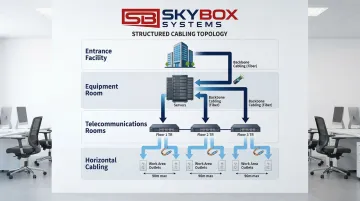
Structured topology organizes cabling into logical layers:
- Backbone cabling: Connects entrance facilities, equipment rooms, and telecommunications rooms (typically fiber)
- Horizontal cabling: Runs from telecommunications rooms to work area outlets (maximum 90 meters)
- Telecommunications rooms: House patch panels and switches on each floor
- Work area outlets: Wall plates where end users connect devices
Cable Distance Limitations
Physical laws impose hard limits:
- Copper Ethernet: 100 meters maximum (328 feet), consisting of 90 meters permanent link plus 10 meters total patch cords
- Multimode fiber: 400 meters for 10 Gbps (OM4); 150 meters for 40/100 Gbps
- Single-mode fiber: 10-100+ kilometers depending on transceiver optics
Network switches act as repeaters, letting you chain multiple 100-meter segments. For longer single runs, fiber is the only option.
Installation Best Practices
Understanding distance limits helps you plan proper cable routes. Quality installation then ensures those routes perform as expected.
Cable management prevents damage:
- Maintain minimum bend radius of 4x cable diameter for copper, 10x for fiber
- Avoid pulling tension above 25 lbf (110 N) for copper cables
- Keep unshielded data cables at least 12 inches from power lines
- Maintain wire twists within 13 mm of termination points for Cat5e, 6 mm for Cat6A
Testing and certification verify every link meets specifications. Professional installers use calibrated test equipment that checks:
- Wire map (correct pin connections)
- Length (within category limits)
- Insertion loss (signal strength)
- NEXT (near-end crosstalk)
- Return loss (signal reflection)
Documentation and labeling make future troubleshooting possible. Every cable, patch panel port, and outlet should have clear, consistent labels that match network diagrams.
Environmental Considerations
Choose cables based on installation environment:
- Temperature extremes: Standard cables operate 0-60°C; special jackets handle -40 to 75°C
- Moisture: Outdoor-rated cables have water-blocking compounds; indoor cables don't
- EMI sources: Use shielded cables near motors, generators, medical equipment, or radio transmitters
- Outdoor installations: Direct-burial cables or conduit protection prevent physical damage and UV degradation
Future-Proofing Strategies
Install higher-category cabling than currently needed. Cat6A costs slightly more than Cat6 but supports 10 Gbps over full 100-meter distances and handles high-power PoE without thermal issues.
Run extra cables during construction. Adding conduit space and extra cable runs during initial installation costs much less than opening walls later.
Partner with certified professionals. Proper installation by trained technicians ensures manufacturer warranties remain valid and systems perform reliably throughout their 10-15 year lifecycle. Skybox Systems employs Panduit Certified Installers trained to BICSI, TIA, and NEC standards, bringing that expertise to commercial installations across Florida and Georgia.
Benefits of Professional Network Cabling
Professional installation delivers measurable advantages that DIY or uncertified work cannot match.
Compliance and performance: Certified technicians like Skybox Systems' Panduit Certified Installers follow manufacturer specifications and industry standards (TIA-568, BICSI, NEC). This ensures cables perform to their rated specifications and installations pass building inspections.
Extended warranties: Major manufacturers (Panduit, Belden, CommScope, Corning) offer 20-25 year system warranties covering both products and application performance—but only when installed by certified partners who provide complete test documentation. These warranties transfer to new building owners and provide long-term protection.
Total cost of ownership advantages:
- Prevents the physical layer failures that cause 50% of network problems, reducing costly downtime
- Complete documentation and testing records identify problems quickly during troubleshooting
- Standards-compliant systems require less frequent repair and adjustment
- Structured cabling supports new equipment without infrastructure changes
Scalability for future technology: Professional structured cabling creates a unified infrastructure that accommodates growth. Adding access points, cameras, or VoIP phones requires no new cable runs—the infrastructure is already there.
As network speeds increase to 10 Gbps and beyond, Cat6A installations won't require replacement.
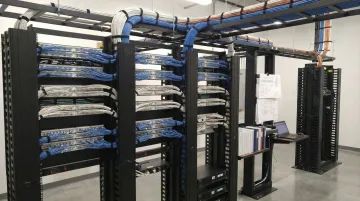
Skybox Systems has served commercial clients across Florida and Georgia since 2009, providing structured cabling installation with certified technicians trained in BICSI, TIA, and EIA standards. Their approach ensures installations meet current needs while providing the foundation for future technology adoption.
Frequently Asked Questions
What is the difference between Cat5e, Cat6, and Cat6A cables?
Cat5e supports 1 Gbps (adequate for basic office use), Cat6 handles 10 Gbps up to 55 meters, and Cat6A delivers 10 Gbps over the full 100 meters with high-power PoE support. For new installations, Cat6A is the recommended minimum.
How far can I run network cables before signal degradation becomes an issue?
Copper Ethernet maxes out at 100 meters (328 feet), multimode fiber reaches 400 meters, and single-mode fiber extends 10-100 kilometers. Use network switches to extend reach beyond these limits.
When should I choose fiber optic over copper cabling?
Choose fiber for distances over 100 meters, bandwidth exceeding 10 Gbps, high electromagnetic interference environments, outdoor runs, or when enhanced security is required. Fiber also future-proofs backbone infrastructure better than copper.
What are structured cabling standards and why do they matter?
Standards like TIA-568 and ISO/IEC 11801 ensure cables from different manufacturers work together and provide a framework for organized, maintainable infrastructure that accommodates future technology without replacement.
Do I need plenum-rated cables for my office?
Plenum-rated (CMP) cables are required in air-handling spaces—areas above drop ceilings or under raised floors where HVAC circulates. Fire codes mandate these low-smoke, fire-resistant cables to prevent toxic fumes from spreading during fires.
How much does professional network cabling installation typically cost?
Cat6A installations typically cost $150-300 per drop including materials and labor, while fiber runs cost more due to specialized equipment. Costs vary based on building complexity, distance, and number of drops. Request detailed quotes from Skybox Systems' certified installers for accurate project estimates.
Conclusion
Network cabling infrastructure is a critical business investment that requires careful planning, proper cable selection, and professional installation. The difference between reliable, high-performance networks and constant troubleshooting often comes down to these foundational decisions.
Key decisions that determine long-term network performance:
- Cable selection: Cat6A for horizontal runs, OM4 or single-mode fiber for backbones supports current operations and future bandwidth demands
- Standards compliance: Following TIA-568 specifications eliminates guesswork and costly mistakes
- Professional installation: Certified installers ensure proper termination, testing, and documentation
Skybox Systems has provided structured cabling installation across Florida and Georgia since 2009, employing Panduit Certified Installers trained to BICSI, TIA, and EIA standards. Their installation approach focuses on maintaining manufacturer warranties, following proper testing protocols, and documenting infrastructure for future scalability. Whether you're building new facilities or upgrading existing infrastructure, professional structured cabling creates the foundation your business depends on.